As much as I hate to say it, this post was written by a so-called human, and no AIs were used in crafting the original text. Fuck your "It's not blah blah blah, but blah blah blah" clauses.
Prologue
I watched the MIT 6.828 lecture on page tables, and I felt like a baboon.
I searched.
Studied blog posts, manuals (though repetitive), wikis, chatted with AI, etc.
And suddenly, there was this moment of realization—it clicked.
In this blog post, I'll take you on the journey I took. We'll go through page tables: starting from the basics, we'll see how the idea of page tables came to be, and explore some optimizations to further understand the underlying concepts.
So, let's start. Shall we?
Imagine Sam has 64 petabytes of RAM. You have every right to ask how on earth he got it, given the current occupation of RAM manufacturing pipelines by giant —or soon-to-be— stock market surfers, to make the next "Pelican riding the Tour de France". Well, Sam is not human, so he can manage to have it all.
Jokes aside, Sam has asked you to help him make this HUGE amount of RAM accessible to his RISC-V Sv39 CPU. Can you help him? Bet you can't, unless you're the legendary Robert Morris. God, I love this guy.
So, come with me as I guide you through the most unrelated problem nobody cares about.
A little background
Remember I told you that Sam had 64 PB of RAM? But how many bytes is that? Turns out, "RAM storage units are defined by the JEDEC standard (who knows what it is), where 1 KB (KIL-uh-bite) of RAM is actually 1 KiB (KIH-bee-bite)." Yes, they are different (notice the 'i'). Yes, RAM doesn't care about the difference. 1 KB is 1,000 bytes, whereas 1 KiB is 1024 or bytes. The point is, in the world of RAM, both mean 1024.
So if you go to Amazon and buy 16 GB of RAM, it's actually 16 GiB, or , rather than .
| Unit | Bytes | Bits |
|---|---|---|
| 1 KB | 1,000 | 8,000 |
| 1 KiB | 1,024 (or 2^10) | 8,192 |
And another table would do the job of a thousand words:
| Unit | Bytes |
|---|---|
| 1 MB (MiB) | bytes |
| 1 GB (GiB) | bytes |
| 1 TB (TiB) | bytes |
| 1 PB (PiB) | bytes |
So, Sam's 64 PB of RAM is = bytes. That's an enormous 18 quadrillion, 14 trillion, 398 billion, 509 million, 481 thousand, 984 bytes. Fuck you, Sam.
Anyway, the question is, "How is Sam going to handle this much memory?" And what do we mean by handle? Keep these two questions in mind, as this whole article is about to answer them.
A quick reminder that each process in your system likes to perceive that it has access to all the memory, starting from
0x0and continuing until it hits the limit.
Plus, we must come up with a mechanism that prevents a process from accessing memory locations that belong to other processes or the kernel itself.
All this brings us to our one and only solution: abstraction. We should add a layer between the process and the actual physical memory (aka RAM). That abstraction, my fellow unemployed computer scientists, is called The Sacred Page Table —without the sacred, of course. This way, we prevent the process from having direct access to memory. Instead, we manage it and keep a little bit of control on our side. But how?
But How?
Well, one way is to keep a page table for each process, mapping an arbitrary address (henceforth called a virtual address) to a actual physical address in memory. After all, two or more processes might want to access 0x0, but we only have one 0x0 on our physical memory. So we create a page table and map each 0x0 to a arbitrary location in memory:
Process A's Page Table
| Virtual address | Physical address |
|---|---|
0x0000 | 0xA000 |
0x1000 | 0x3000 |
0x2000 | 0xF000 |
Process B's Page Table
| Virtual address | Physical address |
|---|---|
0x0000 | 0x7000 |
0x1000 | 0xC000 |
0x2000 | 0x5000 |
That's great, but our current implementation could grow to as many as rows (entries) in each page table (that's all the memory we have, remember?). It's because we don't have any boundaries, and each process would like to have all the memory if needed. The thing is, once we want to search and walk through these page tables, having long ones becomes problematic.
So maybe we'd better do some grouping. How about we group every 4096 or bytes into one group? This way, we'll have fewer items to search at the first stage, and once we find our target group, we'll index through its 4096 members. (You might ask why 4096? That's the number they came up with, so I have no other choice than using it for the purpose of telling the story.)

(1) Our Normal Memory Layout

(2) Grouped Memory Layout
This way, our page table would only grow as far as... you say it. OK, I'll say it: We previously had bytes or 64 PB. We grouped every 4096 (or ) bytes, so we have
Let's get a bit more pro and call these groups page frames.
Page Table vs. Page Frame: Once we divide the memory into 4096-byte chunks, we call each chunk a page frame. Then each page frame might be used either as a page table or a data page (wherever we store normal memory data). In fact, we'll be using page tables to route access to both data pages and the other page tables.

(3) Page Frame vs. Page Table vs. Data Page
So, in other words, we have page frames (groups). This means our page tables would at most have entries (rows). That's far better than —4096 times fewer. Okay, enough numbering, but there is still one thing missing: the offset. Say we have identified our desired page frame using 44 bits in the virtual address that points to our desired target. Here, we will need 12 extra bits to locate the target within that page frame. So, 44 bits for determining the frame and 12 more for offset: .

(4) Physical Address Translation
But did you notice that we're still allowing each process to have 64 PB of memory? Let's be real for a second: Is there any app that consumes that much memory (except for VS Code and Google Chrome)? So, how much memory is actually enough for a process? According to the current implementation of RISC-V Sv39, instead of having 44 bits for the physical page number, we have only 27 bits (which added by 12 bits for offset, gives us 39 bits. That's why we call it Sv39). That is, we get to have page frames, each containing 4096 bytes, so the total virtual storage dedicated to each process would be:
So, to cut down the available memory, we limit how many page frames a process has access to: instead of 2^44 pages-frames/process, we get to have 2^27 page frames/process. But remember, there are still 2^44 page frames in the whole system. We just give each process a smaller slice of it.
Nowadays, it's a reasonably high amount of RAM for a single process. Compared to the previous 64 petabytes, it is orders of magnitude smaller. But there is another problem. Yes, baby. Problem after problem. Page tables are like your girlfriend: they never run out of problems. But what now? Well, if you were smart enough, you'd have already realized that all these tables must also be stored somewhere. But where and how? Answering these questions will require its own blog post, but another immediate question would be: "How much memory do we need to store a page table itself?"
Enough Memory for a Page Table
In our current model, we have page frames, each capable of storing a page table with entries. But we never got a chance to discuss what an entry is.
The Anatomy of a Page Table Entry
An entry is just a row in the page table.
Remember the table I drew? It was something like:
| Virtual address | Physical address |
|---|---|
0x0000 | 0xA000 |
0x0001 | 0x3000 |
0x0005 | 0xF000 |
Well, the reality is a bit different, in the sense that we use the row number instead of the first column, so it looks like:
| Physical address |
|---|
0xA000 |
0x3000 |
| — |
| — |
| — |
0xF000 |
So if we want 5, we go to row 6 (with 1-based indexing). The visualization is not entirely accurate, but it conveys the idea.
So, are we sticking to this one-column table? No. In reality, we still need a second column called flags, which is 10 bits wide. Flags are used to check whether a process can access the page, whether it is readable, writable, etc. So, 10 bits for the second column, but how many bits for the first column? Of course, 44—because we need each of these entries to point to a page frame. And since there are page frames that a row can point to, the column is 44 bits. So .
That is how wide a row is.
Ummm, 54... doesn't really sound like a round number to me. For the sake of future efficiencies with CPU operations and instructions, we'd better work with multiples of 8 bits (1 byte). Since in RISC-V, the term "doubleword" is often used to refer to a 64-bit chunk (though the size varies by architecture), we'd like to extend 54 to 64 (and we don't care about the extra wasted space).
As a result, we will have entries, each 8 bytes (64 bits) long. That's a table of size
It's a disastrous number. As of writing this blog post, I'm running 463 processes on my machine. That would be a ridiculous 463 GiB of tables —more than the SSD storage available to me, let alone RAM.
To hell with this!
What do we do now, sir? I hear the residents of the town of Dirt ask.
Now... we ride! (Only if riding means cutting a 27-bit-long entry into three 9-bit sub-addresses.)
This means, instead of having one page table as tall as rows, we get to have a 3-level hierarchy.
Remember where this 27 came from? We agreed that instead of having 44 bits for the page frame, we just use 27. This shrank each process's accessible memory from 64 PiB to 512 GiB.
We now split this 27-bit-long index into 3 sections. Why 3? Because what else is 27 divisible by? Then each section is 9 bits long. That means it can index into a page table with entries (rows). Each row is still the same 8-byte thing:
Great! And so are the next two 9-bit subsections. That's how we end up with 3-level page tables.
But how do we use them? A picture could explain better:
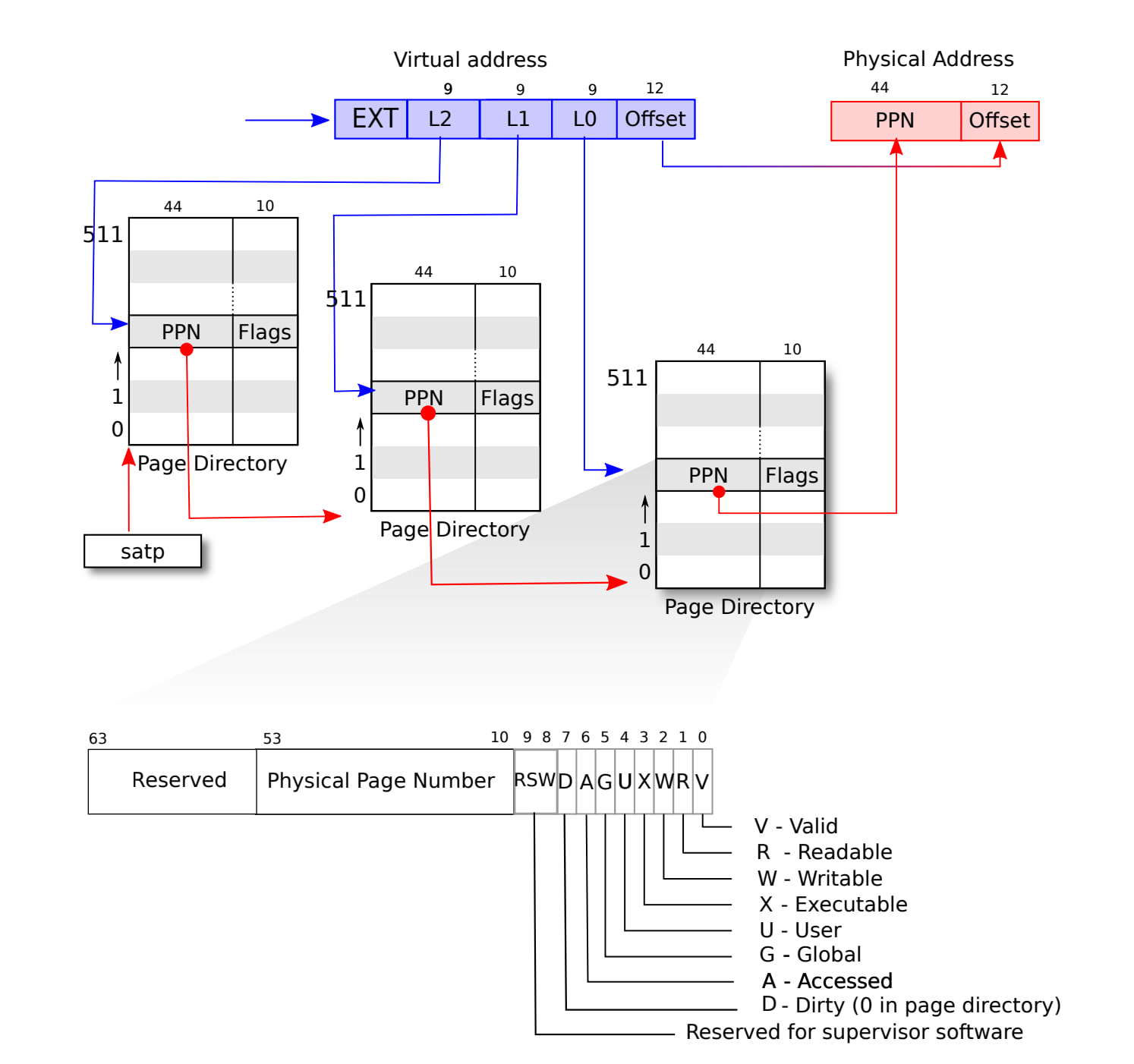
(5) RISC-V Address Translation details, source: xv6-book
As you can see, the first and second page tables point to the page frame where the next page table starts. It is only the third one that points to a page frame containing actual data. But how much storage is required to store these three page tables? Every page has rows, with each row being 8 bytes. That's bytes or 4 KiB of RAM. So, three page tables, each 4 KiB, that's 12 KiB. Compared to the ridiculous 1 GiB that we got in the previous section, it's truly miraculous.
To me, it is still mind-blowing how different these numbers are.
But don't let them trick you for too long...
Thou Shalt Not Fool Me!
Don't let these numbers trick you for too long. Even if the new method takes only 12 KiB for now, it doesn't mean it's always going to be this way. The thing is, this number can grow.
I'm sure you don't have the slightest idea what I'm talking about, so let's take an example. Imagine we have this app called "Wiggly Biggly." Throughout the execution of its instructions, it wants to access the virtual addresses 0x0000_0000_1000 and 0xFFFF_FFFF_F000. Now let's analyze the page table size in the two models:
-
Single-level Page Table
-
Multi-level Page Table
Single-level Page Table
Example 1
0x0000_0000_0000_1000 is 0b0000_0000_0000_0000_0000_0000_0000_0000_0000_0000_0000_0000_0001_0000_0000_0000.
The first 12 bits from the right are the offset.
The next 27 bits are index—which are all 0, except for the first one.
We are accessing the second element (index is 0x000) of a page table at virtual address 0x0000_0000_1.

(6) One-level Page Table — Example 1
Example 2
0xFFFF_FFFF_FFFF_F000 is 0b1111_1111_1111_1111_1111_1111_1111_1111_1111_1111_1111_1111_1111_0000_0000_0000.
If you wonder why we bother flipping those extra 25 bits to 1, It's a convention that those extra bits must match the 38th bit (sign extension).
The first 12 bits are 0. They are the offset.
The next 27 bits are all 1, making the index 134,217,727 (2^27 - 1). This means we need to look at the 134,217,728th entry (notice the 0-based indexing) of the page table (counting from the bottom).

(7) One-level Page Table — Example 2
Remember that we specified 8 bytes to each entry so the 134,217,728th entry will start at the byte of the page table. This number is equal to 1 GiB. Our little "Wiggly Biggly" program requires a GIGABYTE of RAM, regardless of the fact that it asks for only two virtual addresses. We are just so unbelievably unlucky that one of them is so large.
Of course, this example is a bit exaggerated, but it demonstrates the catastrophic consequences of the single-level page table. So we conclude that the minimum and maximum page table sizes in this model are both 1 GiB.
Why do we create the whole table? Can't we just make space for those two entries? Well, no! The thing is, if we don't create the full 1 GiB page table upfront, a subsequent access to a virtual address at the far end of the page table will result in a page fault. And believe me, we DON'T want that!
Now let's examine the multi-level model.
Mutli-level Page Table
Example 1
Here's a picture for the first address (0x0000_0000_0000_1000).

(8) Multi-level Page Table — Example 1
And for 0xFFFF_FFFF_FFFF_F000:

(9) Multi-level Page Table — Example 2
Note that at each level, the data in the PPN column points to the physical address where the next page starts.
This time, we occupied the topmost entry of each page table too, but each table is only 4 KiB in size (instead of 1 GiB). So, we have occupied only 12 KiB. As a result, our optimization has lowered the minimum storage required for a page table, though the maximum still remains at 1 GiB —and a bit more.
"How is the maximum still 1 GiB?" I hear you ask.
Well, currently each page table has one entry, but if it grew and wanted to access every 4 KiB page across the whole 512 GiB, things would go a bit differently. In that case, the first page table would be filled. That's a total of 4 KiB.
Then each row of the first page table might point to a different 4 KiB page table in L1. That's
Again, each of these entries, could point to a 4 KiB page table in L0:
Addin 'em up, we get:
That's it! We have a design that grows only if necessary. The minimum is 12 KiB and the maximum is ~ 1 GiB
Epilogue
As I was writing this article, I started to feel a bit intimidated by how much I was explaining things. So, you might notice that as you go through the post, explanations are less frequent.
I noticed this as well, and I plan to improve it in the upcoming essays.
This was a demonstration of my struggles at understanding page tables while studying the MIT 6.828 course available online.
Thanks for reading.
— Davoud